This recall involves removing certain devices from where they are used or sold. The FDA has identified this recall as the most serious type. This device may cause serious injury or death if you continue to use it.
Affected Product

Figure 1. StatStrip Glucose Hospital Meters. Left – Gen 2.0, Right – Gen 1.86.
The FDA is aware that Nova Biomedical has issued a letter to affected customers recommending that all affected StatStrip Glucose Hospital Meters be removed from where they are used or sold until a software update becomes available. This removal only applies to the most recent model of the StatStrip Glucose Hospital Monitoring System, the “Gen 2.0” model (Figure 1 – left), and does NOT apply to any previously released model of the StatStrip Glucose Hospital Meter System such as the “Gen 1.86”, (Figure 1 – right).
Affected devices:
|
Product |
Model Number |
UDI/DI |
|---|---|---|
|
StatStrip Glucose Hospital Meter System |
63685 |
|
|
Glucose Hospital Meter System Multipack |
66739 |
What to Do
Users should review and follow the recommendations below while awaiting a software update.
On July 31, Nova Biomedical sent all affected customers an initial letter. This letter was updated letter on October 5 and recommended the following actions:
- If applicable and your Electronic Medical Record (EMR) system includes integrated Admission, Discharge, and Transfer (ADT) information, confirm that the patient validation setting (Validate Patient ID’s) is configured within NovaNet as shown in the picture below. Please ensure that the box next to “Validate Patient ID’s” is checked and then click the “Apply” button to configure this function in NovaNet.
Note: This feature can only be utilized by customers who are using ADT with their systems.
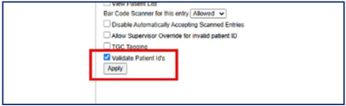
Figure 2. Validate Patient ID’s checkbox.
- Configure your StatStrip Glucose Hospital Meters to automatically log the operator out of the meter after each test. Within NovaNet, select the “Logoff” button from the top tool bar to open the ‘Logoff Setup’ menu as shown in the picture below. In the dropdown next to ‘Operator Logoff Mode’, select the “Test” mode then click the ‘Apply’ button to configure this setting.

Figure 3. Logoff Setup Menu.
- After every barcode scan, verify on the device that the patient ID displayed is for the patient currently being tested. Confirm that the patient name, date of birth, and other identifying information shown on the Confirm Patient ID screen correspond to the patient whose sample is being collected before pressing Accept. When the glucose result populates on the device after testing is complete, verify again that the patient ID displayed on the result screen belongs to the patient currently being tested. Do not assume that the patient ID displayed at the time of result is the same as the one verified at the time of scanning.
- If any glucose level is assigned to the incorrect patient, immediately notify your administrator. If you do not have an alternative device, you must continue to follow these mitigation steps until the software fix becomes available. If you have an alternative device, you should stop using the affected device.
- Ensure that any glucose result identified as incorrectly assigned to a patient’s medical record is immediately flagged or removed so that other healthcare providers are aware it is an error and do not use it to guide glucose management decisions. Follow your facility’s established procedures for correcting erroneous entries in the EMR and notify the treating clinical team promptly.
Reason for Recall
Nova Biomedical stated the issue affects StatStrip Glucose Hospital Meter Systems (Gen 2.0) operating on all versions of firmware and does not impact the analytical performance of glucose measurements.
Nova Biomedical has received reports from customers indicating that when scanning patient ID or Quality Control (QC) barcodes, prior information may remain on the meter screen, which if accepted, will lead to a glucose result being assigned to the wrong patient’s medical record or QC ID. If not recognized, healthcare providers may make clinical decisions based on another patient’s glucose result, potentially leading to delayed treatment, unnecessary treatment (including inappropriate insulin administration), and/or failure to treat the intended patient. The severity of harm depends on the patient’s actual glucose status and clinical condition. Critically ill patients and infants, who may be unable to communicate symptoms of hypoglycemia, are at greater risk of adverse outcomes.
As a precautionary measure, Nova has implemented a shipment hold on all new model StatStrip Glucose Hospital Meter Systems (Gen 2.0) while corrective actions are being developed and validated. Efforts are underway for the verification and validation of a software update to address this issue. Nova intends to roll out the software update in November 2026 in a phased manner. This will include measures to mitigate the issues related to the recall, as well as other non-safety-related improvements.
As of October 5, Nova Biomedical has reported one serious injury and no deaths associated with this issue.
Device Use
The StatStrip Glucose Hospital Meter is a hand-held, battery-powered, in vitro diagnostic laboratory instrument that works in conjunction with Nova Biomedical glucose electrochemical test strips to measure glucose in a whole blood sample or a Quality Control (QC) solution. In addition to measuring glucose, the meter stores patient test data, QC test data, and other information relating to patient, patient sample, operator, reagents, and the meter.
Contact Information
Customers in the U.S. with adverse reactions, quality problems, or questions about this recall should contact Nova Biomedical at 1(800) 545-6682.
Additional FDA Resources
Additional Company Resources
Unique Device Identifier (UDI)
The unique device identifier (UDI) helps identify individual medical devices sold in the United States from distribution to use. The UDI allows for more accurate reporting, reviewing, and analyzing of adverse event reports so that devices can be identified more quickly, and as a result, problems potentially resolved more quickly.
How do I report a problem?
Health care professionals and consumers may report adverse reactions or quality problems they experienced using these devices to MedWatch: The FDA Safety Information and Adverse Event Reporting Program.